
ボタンを角丸にしたり、TextView等に枠線をつける方法を紹介します。
基本的にはレイアウトのxmlファイルを作成し、ボタン等のbackgroundに作成したxmlを
指定することで実現できます。
レイアウトxmlファイル作成方法
まずは下図にあるようにdrawableディレクトリ直下にxmlファイルを作成していきます。

drawableを右クリックして「drawableリソースファイル」をクリック。

ルート要素をshape にしてOKをクリック
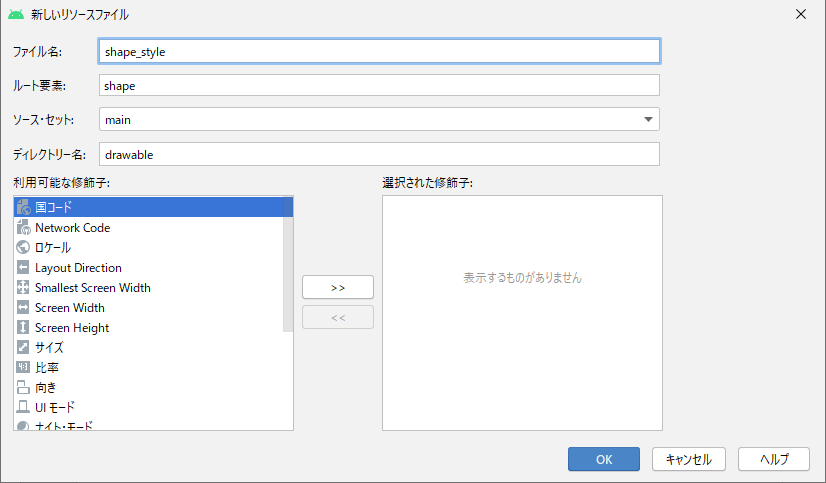
作成したxmlファイルの中身を作っていきます。
コードはこちら
|
1 2 3 4 5 6 7 8 9 10 |
<?xml version="1.0" encoding="utf-8"?> <shape xmlns:android="http://schemas.android.com/apk/res/android"> <!-- 背景色 --> <solid android:color="#ffa500" /> <!-- 角丸 --> <corners android:radius="5dp" /> </shape> |
cornersのradiusの値を変えることで角丸を調整できます。
activity_mainの内容
activity_main.xmlのコードはこちら
|
1 2 3 4 5 6 7 8 9 10 11 12 13 14 15 16 17 18 19 20 21 22 23 24 25 26 27 28 29 30 31 |
<?xml version="1.0" encoding="utf-8"?> <androidx.constraintlayout.widget.ConstraintLayout xmlns:android="http://schemas.android.com/apk/res/android" xmlns:app="http://schemas.android.com/apk/res-auto" xmlns:tools="http://schemas.android.com/tools" android:layout_width="match_parent" android:layout_height="match_parent" tools:context=".MainActivity"> <Button android:id="@+id/button" android:layout_width="wrap_content" android:layout_height="wrap_content" android:layout_marginStart="116dp" android:layout_marginTop="124dp" android:text="通常" app:layout_constraintStart_toStartOf="parent" app:layout_constraintTop_toTopOf="parent" /> <Button android:id="@+id/button2" android:layout_width="wrap_content" android:layout_height="wrap_content" android:layout_marginStart="116dp" android:layout_marginTop="240dp" android:background="@drawable/shape_style" android:text="角丸" app:layout_constraintStart_toStartOf="parent" app:layout_constraintTop_toTopOf="parent" /> </androidx.constraintlayout.widget.ConstraintLayout> |
ボタンのbackgroundに作成した角丸のxmlを指定します。
|
1 |
android:background="@drawable/shape_style" |
以下のように角丸を表示することができました。

カスタマイズの基本は以上です。
以下では枠線のつけ方等を紹介します。
枠線
android:shape="rectangle" を設定します。
|
1 2 3 4 5 6 7 8 9 |
<?xml version="1.0" encoding="utf-8"?> <shape xmlns:android="http://schemas.android.com/apk/res/android" android:shape="rectangle"> <stroke android:width="1dp" android:color="#ff0000" /> </shape> |

丸
android:shape="oval" を設定します。
|
1 2 3 4 5 6 7 8 |
<?xml version="1.0" encoding="utf-8"?> <shape xmlns:android="http://schemas.android.com/apk/res/android" android:shape="oval"> <!-- 背景色 --> <solid android:color="#4169e1" /> </shape> |

今回は以上となります。
